



Speed
words per minute
characters typed÷ 5÷ minutes
Example150 characters in 1 minute30 WPM
Five characters make one word. A vowel sign counts as a character, and wrong characters count too: that is why accuracy is shown beside speed.
Type a Punjabi passage against the clock and see your speed and accuracy, then try again and beat your last run.
Start typing to begin
The clock starts with your first key.
Results are saved in this browser on this device.
No personal best yet. A run counts once it has run its full time or reached the end of the passage, with at least 80% accuracy.
No results saved yet.
Four quick steps
Pick a time, from one minute to ten, or untimed, and a keyboard.
The clock starts with your first letter, or when you press Start. Spaces, Enter and pasted text do not start it.
Words turn green when right and are underlined when wrong. Backspace fixes a slip; Enter, undo and redo do nothing.
Your speed, your accuracy, the words that did not match, and how this run compares with your last.
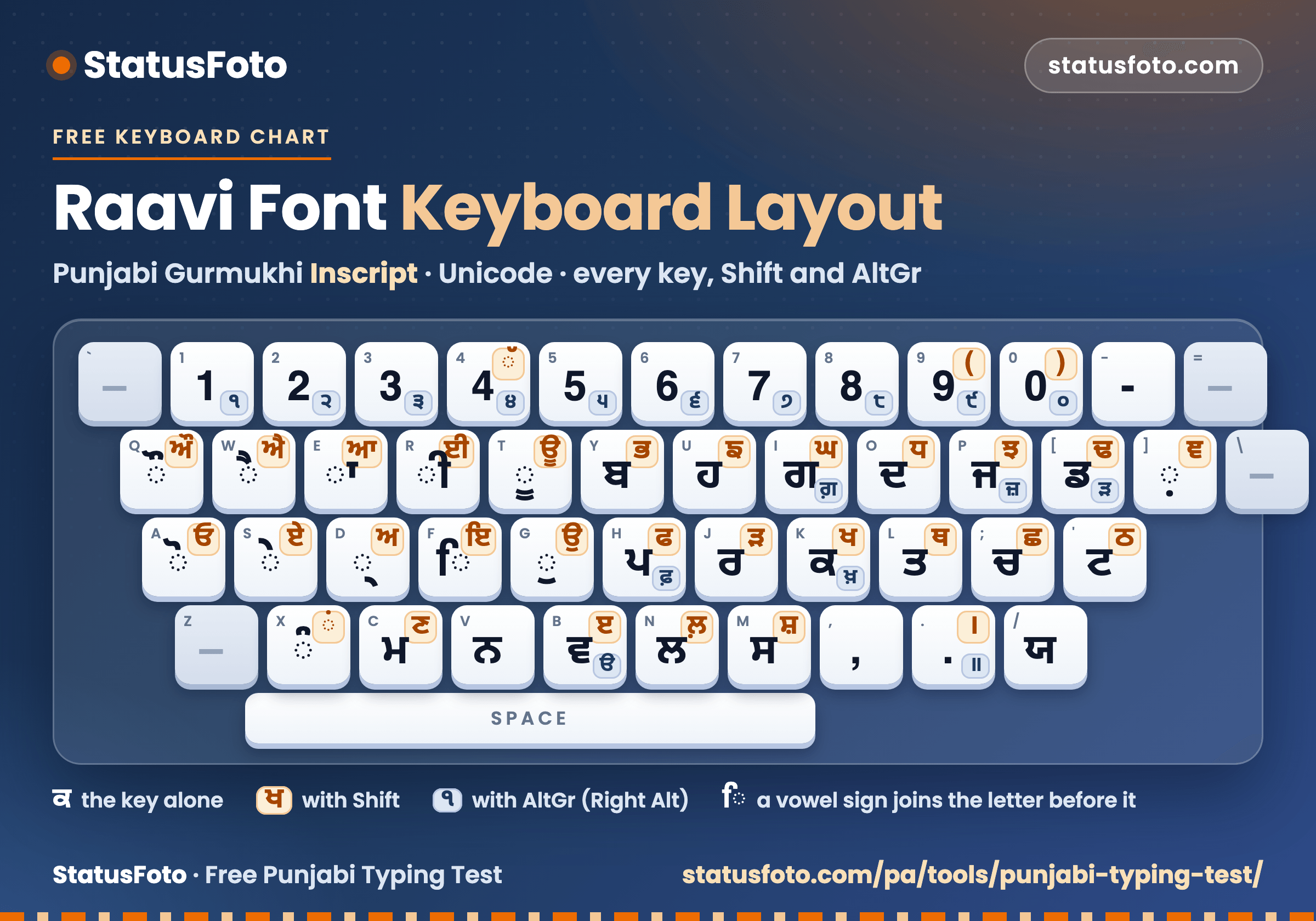
Free chart
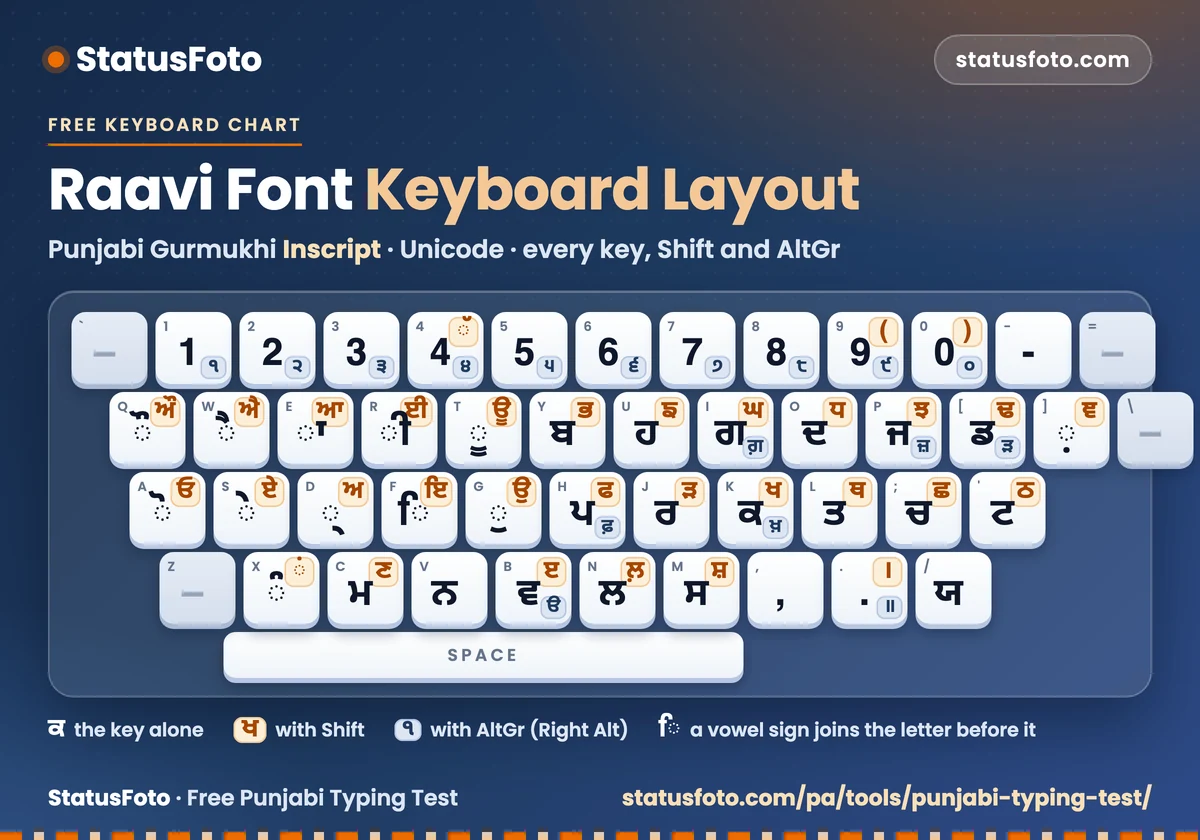
Made by StatusFoto from the layout table of the typing test. The table is checked against the recorded layout and has not yet been compared key by key on a real Windows computer.
No black box
words per minute
characters typed÷ 5÷ minutes
Five characters make one word. A vowel sign counts as a character, and wrong characters count too: that is why accuracy is shown beside speed.
per cent of words
1 − (wrong or missing words ÷ words)× 100
A word is right only when every character of it is right, as in the exam. An extra, a missing or a wrong word costs one. Your character accuracy is shown beside it.
Only the part of the passage you reached is compared, so words you did not get to are not counted as mistakes.
If not one word matches the passage, your accuracy is 0%. A different text never looks partly right.
A complete run (the full time, or the end of the passage) with at least 80% accuracy. Each time and keyboard choice has its own best, so a 1-minute best is never compared with a 10-minute one.
The passage and the typing box are drawn in Raavi on a computer that has it (Windows does) and in Noto Sans Gurmukhi on any other, so the shapes can differ a little between devices. The characters you type are Unicode Gurmukhi either way.
From the Board's own notice
The Punjab Subordinate Services Selection Board advertisement for Clerk posts (Advertisement No. 02 of 2026, section 7, read on 9 November 2026) says candidates take an English and a Punjabi type test at a speed of 30 words per minute, on a computer, with the Punjabi test in the Unicode font Raavi, and that the type test is qualifying and mandatory. It does not state the test length, an accuracy limit or the keyboard layout.
This page is practice. It is not the exam software, its counting is its own (shown above), and a result here is not an official score. Check the notice of your own exam for its rules.
Quick answers
Raavi font text is typed with the Gurmukhi Inscript layout: each key of an ordinary keyboard types one Punjabi character, and Shift and AltGr give more. The chart above shows every key, and the same layout is built into the typing test when you choose Raavi Font.
The text is Unicode Gurmukhi, which is what the Raavi font displays. The passage is drawn in Raavi when your computer has it and in a web font otherwise, so on some devices the shapes are not exactly Raavi, but the characters are. Older fonts such as Asees and Anmol Lipi are not used here; the Punjabi Font Converter turns them into Unicode.
No. With Raavi Font selected, the keys of your ordinary keyboard type Gurmukhi in the Inscript layout, so you can practise on any computer. If you already type Punjabi with Windows or a phone keyboard, choose My keyboard.
Yes. Backspace and Delete work to correct a mistake. Undo and redo are switched off so that the answer always matches what you typed.
Characters typed ÷ 5 ÷ minutes, so 5 characters make one word. Wrong characters still count toward the speed, which is why the accuracy is shown beside it. Correct words per minute counts only the words that were right.
The Board's Clerk advertisement of 2026 names 30 words per minute for the Punjabi type test. The test length, accuracy limit and counting rules are not in that advertisement, so this page does not state them.
Your results are kept in your own browser, on your own device. Nothing is uploaded. You can look at each saved result, delete one, or reset everything under "Saved on this device".
Yes. There is no sign-up, no login and no payment.
You can, but typing on a phone screen is different from typing on a computer keyboard, and exams are taken on a computer. Use a computer keyboard when you are preparing for an exam.
Practice only; not an official exam. Questions or corrections? Contact us.